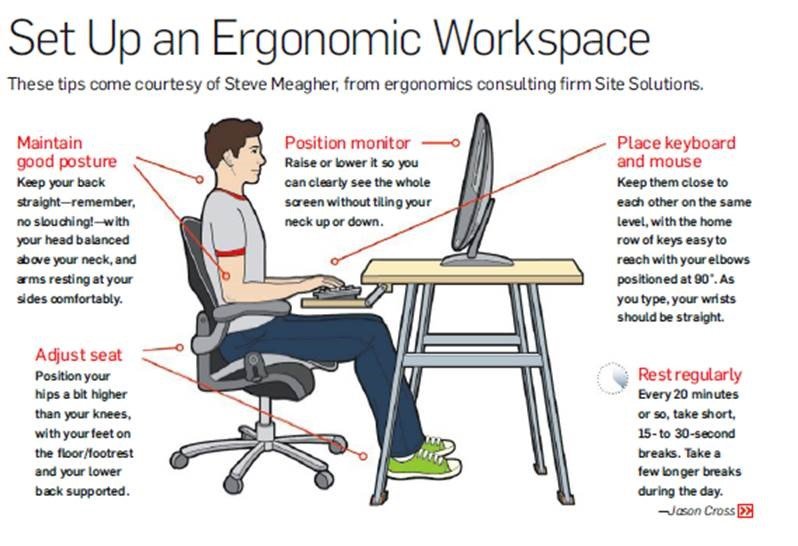
10 Essential Ergonomic Tips for a Comfortable Workspace
Creating a comfortable workspace is essential for productivity and overall well-being. Here are 10 essential ergonomic tips to help you optimize your work environment:
- Adjust Your Chair: Ensure your chair supports your lower back and can be adjusted to your height, promoting good posture.
- Monitor Position: Place your monitor at eye level to avoid straining your neck. The top of the screen should be at or just below eye level.
- Keyboard and Mouse Placement: Keep your keyboard and mouse close enough so you can maintain a relaxed arm position. Your elbows should be at a 90-degree angle.
- Take Regular Breaks: Use the 20-20-20 rule—every 20 minutes, look at something 20 feet away for at least 20 seconds.
- Position Your Feet: Keep your feet flat on the ground or on a footrest. This helps maintain a proper posture and reduces strain.
Continuing with the essential ergonomic tips, here are the remaining five:
- Lighting: Ensure your workspace is well-lit to reduce eye strain. Use a desk lamp if necessary, and avoid glare.
- Desk Height: Adjust your desk height so that your forearms are parallel to the ground while typing.
- Stay Hydrated: Keep water nearby to encourage regular hydration, which can enhance your focus and comfort.
- Organize Your Workspace: A clutter-free environment can improve concentration. Keep frequently used items within easy reach.
- Consider a Standing Desk: Alternating between sitting and standing can alleviate pressure on your spine and improve circulation.
If you're looking for versatility and comfort while using your tablet, consider exploring the Top 10 Adjustable Tablet Stands. These stands offer various height and angle adjustments, ensuring you find the perfect position for your viewing needs. With options ranging from compact designs to more stable models, you're sure to find one that fits your lifestyle and enhances your tablet experience.
The Importance of Ergonomics: How to Prevent Workplace Injuries
Ergonomics plays a crucial role in maintaining a safe and healthy workplace. By designing work environments that fit the physical and cognitive needs of employees, organizations can significantly reduce the risk of workplace injuries. For example, proper desk setups, appropriate chair heights, and the use of ergonomic tools can help alleviate strain on the body. According to the U.S. Bureau of Labor Statistics, musculoskeletal disorders account for a substantial portion of workplace injuries, highlighting the need for effective ergonomic practices.
Implementing an ergonomic strategy involves a few essential steps:
- Conducting assessments of current workplace setups to identify risk factors.
- Providing training for employees on proper posture and equipment use.
- Encouraging regular breaks to reduce repetitive strain and fatigue.
Is Your Workspace Making You Uncomfortable? Signs You Need an Ergonomic Makeover
In today's fast-paced work environment, ergonomics plays a crucial role in ensuring our comfort and productivity. If you find yourself frequently adjusting your chair or making odd stretching motions, it might be a sign that your workspace needs an upgrade. Here are a few signs you need an ergonomic makeover:
- Persistent Discomfort: If you experience chronic pain in your back, neck, or wrists, it's time to reassess your seating and desk arrangement.
- Frequent Fatigue: A workspace that doesn't support your body can lead to mental and physical fatigue, impacting your overall performance.
Moreover, proper ergonomics not only enhances comfort but also boosts productivity. Look for indicators that you might be straining your body, such as an awkward typing position or an improperly aligned monitor. Implementing adjustments, like a supportive chair or a height-adjustable desk, could significantly improve your work experience. Remember, taking care of your body is an investment in your work efficiency, and recognizing signs you need an ergonomic makeover is the first step towards a healthier workspace.